

A practical guide to learning AWS, automation, CI/CD, Docker, Terraform and cloud deployment through hands-on projects.
Learning DevOps can feel confusing when you are just starting out. You may understand what Docker does, know a few Linux commands and have heard about AWS, Jenkins and Kubernetes. However, when someone asks you to build and deploy an application using these technologies, knowing where to begin can be difficult.
That is where practical projects make a difference.
Instead of learning every tool separately, you can understand DevOps by working on small projects that solve real technical problems. For example, you could host a website on Amazon S3, deploy an application on an EC2 instance, automate its deployment using GitHub Actions and eventually build a complete CI/CD pipeline.
The best part? You do not need years of experience to get started.
In this guide, we will explore 10 DevOps projects for beginners using AWS in 2027, arranged from simple cloud exercises to more advanced deployment workflows. You will learn which tools to use, how each project works, what skills you can develop and how to present your work in a GitHub portfolio.
Whether you are a student, fresher, working professional or someone planning to move into cloud and DevOps, these projects will give you a practical starting point.
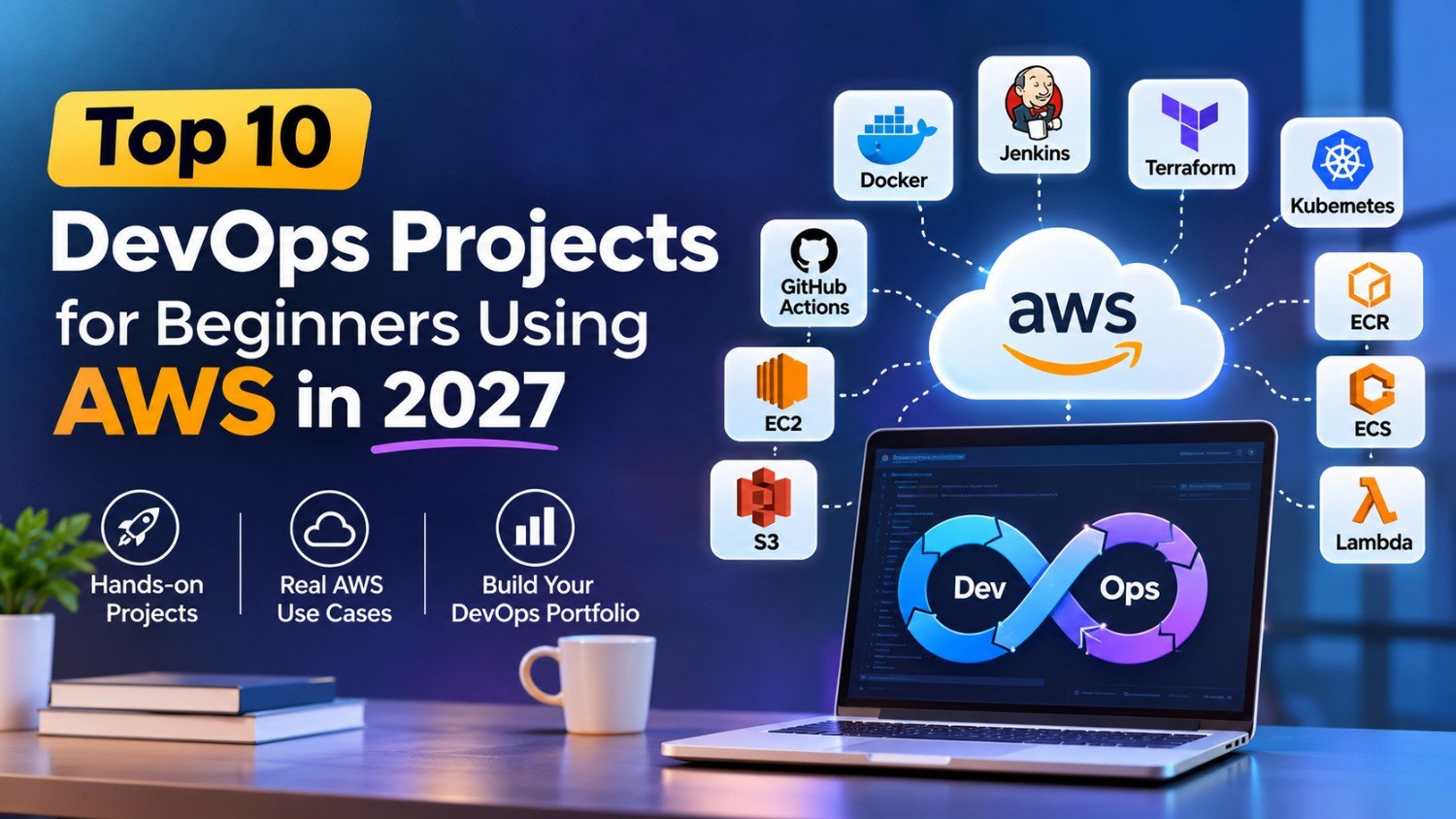
Why Are Practical DevOps Projects Important for Beginners?
Imagine two candidates applying for an entry-level DevOps position.
The first candidate can explain Docker, AWS and CI/CD concepts. The second candidate can explain the same concepts and demonstrate a working application deployed on AWS, a GitHub Actions workflow and a Docker container.
Which candidate can demonstrate more practical understanding?
The second candidate has something concrete to discuss.
This does not mean projects replace professional experience. However, they help you demonstrate how you approach technical tasks, understand infrastructure and solve problems.
By working on DevOps hands-on projects, you can:
- Understand how applications move from development to production.
- Practise Linux administration and cloud infrastructure.
- Learn how Git and GitHub support collaborative development.
- Automate repetitive deployment tasks.
- Understand containerisation using Docker.
- Work with AWS services such as EC2, S3, IAM and CloudWatch.
- Develop troubleshooting and monitoring skills.
- Build a portfolio that supports your job applications.
Most importantly, practical experience helps connect individual concepts. You begin to understand not only what a tool does, but also why and when an engineering team uses it.
What Should You Learn Before Starting AWS DevOps Projects?
You do not have to master every DevOps technology before building your first project. Nevertheless, a few fundamentals will make the learning process much smoother.
1. Linux Basics
Linux is widely used in cloud infrastructure and server environments. Start with file management, permissions, package installation, processes, SSH and basic shell commands.
2. Git and GitHub
Learn how to create repositories, commit changes, work with branches and push code to GitHub. These concepts will become especially useful when you automate application deployments.
3. AWS Fundamentals
Begin with these commonly used AWS services:
- Amazon EC2: Run virtual servers in the cloud.
- Amazon S3: Store files and objects.
- AWS IAM: Manage identities and permissions.
- Amazon VPC: Understand cloud networking.
- Amazon CloudWatch: Monitor resources and application logs.
- Amazon RDS: Work with managed relational databases.
4. Basic Programming and Scripting
You do not need to be an expert programmer. However, basic Python, shell scripting, HTML and an understanding of application structure will help.
5. Networking Fundamentals
Understand IP addresses, DNS, ports, HTTP/HTTPS, subnets, routing and security groups.
A useful learning approach: Study a concept, apply it in a small project and then move to the next concept. This is more effective than trying to learn ten tools simultaneously.
10 AWS DevOps Projects for Beginners
The following projects follow a progressive learning path. The first projects introduce AWS infrastructure, while the later ones combine multiple DevOps tools into practical deployment workflows.
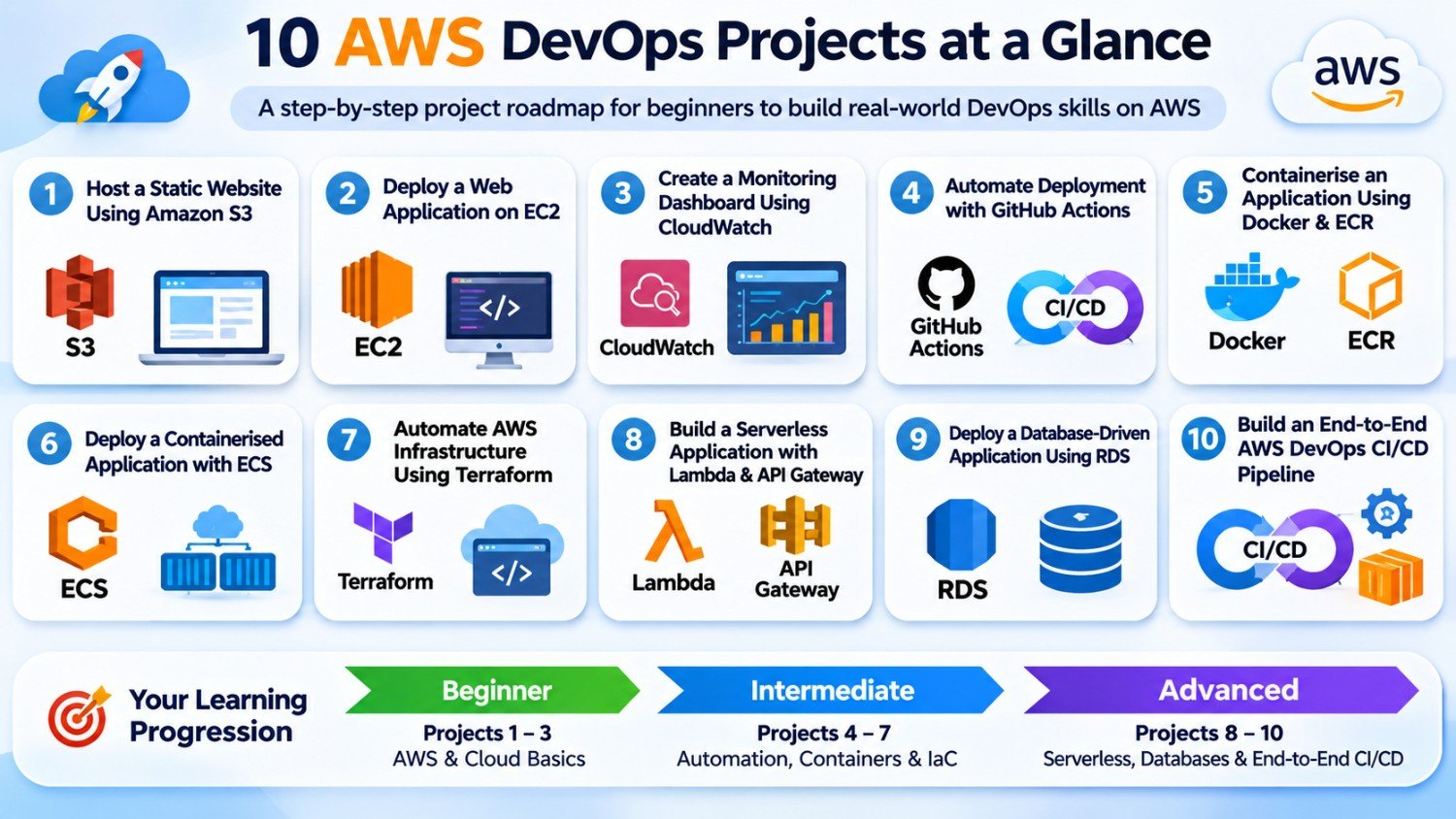
Project 1: Host a Static Website Using Amazon S3
Difficulty: Beginner
Technologies: Amazon S3, HTML, CSS, AWS IAM and CloudFront.
If you have never used AWS before, hosting a static website is a good first project.
You will create a simple portfolio website and make it accessible through an AWS hosting setup. This helps you understand cloud storage, permissions and how website files are delivered to visitors.
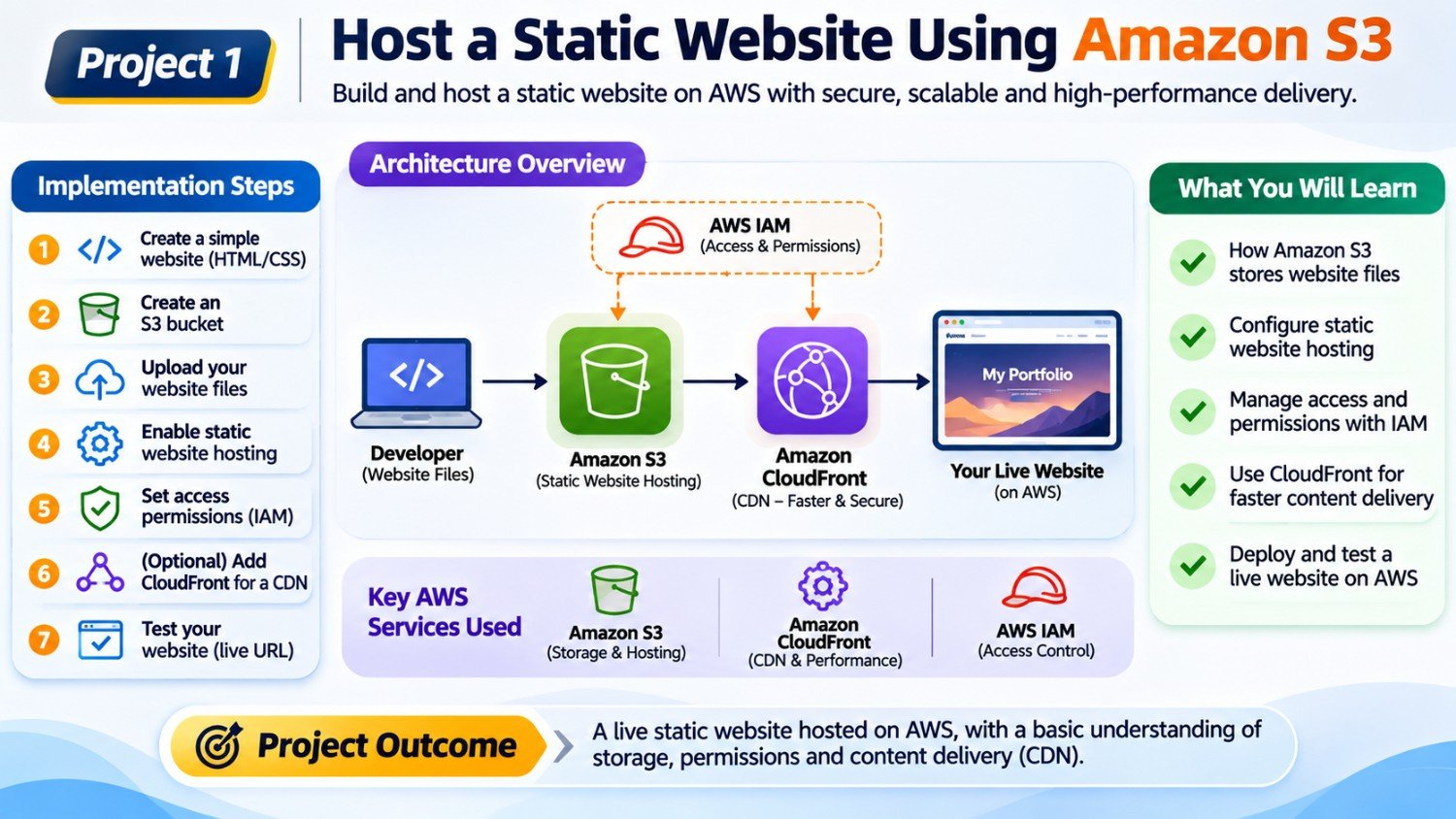
How to Build This Project
- Create a simple website using HTML and CSS.
- Sign in to the AWS Management Console.
- Create an S3 bucket.
- Upload your website files.
- Configure the appropriate hosting and access settings.
- Test the website endpoint.
- Explore CloudFront to distribute website content through a CDN.
What Will You Learn?
- How Amazon S3 stores files.
- How bucket policies and access permissions work.
- The basics of cloud website hosting.
- How CloudFront improves content delivery.
- How to manage website files in AWS.
Portfolio result: A working static website hosted using AWS, supported by screenshots and a short project explanation.
Practical challenge: Try updating the website and documenting how the new version becomes available.
Security note: For a production-style setup, consider keeping the S3 bucket private and using CloudFront with an appropriate origin access configuration. Do not expose storage publicly without understanding the risks.
Project 2: Deploy a Web Application on Amazon EC2
Difficulty: Beginner
Technologies: Amazon EC2, Linux, Nginx, SSH and Security Groups.
Now that you have explored cloud storage, it is time to work with a cloud server.
Amazon EC2 provides virtual computing capacity in AWS. In this project, you will launch a Linux instance, install a web server and deploy a simple application.
This is a useful exercise because server deployment is a fundamental part of many cloud and DevOps workflows.
How to Build This Project
- Launch an EC2 instance using a suitable Linux image.
- Configure a security group with the required network access.
- Connect to the instance using SSH.
- Update the operating system packages.
- Install Nginx.
- Upload your website files.
- Configure the web server.
- Test the application through the server endpoint.
- Review the server logs if something does not work.
What Will You Learn?
- How cloud virtual machines work.
- How to connect to Linux servers.
- How to install and configure Nginx.
- How security groups control network traffic.
- How applications are deployed on cloud infrastructure.
Portfolio result: A web application running on an AWS EC2 instance.
Practical challenge: Configure a custom domain and HTTPS using an appropriate DNS and certificate setup.
Project 3: Create an AWS Monitoring Dashboard Using CloudWatch
Difficulty: Beginner to Intermediate
Technologies: Amazon EC2, CloudWatch Metrics, CloudWatch Logs, CloudWatch Alarms and SNS.
Deploying an application is only one part of the job. You also need to know whether the application and infrastructure are working correctly.
For example, what happens when CPU utilisation becomes unusually high? How would you identify an application error? How would you know that a server needs attention?
This project introduces monitoring and alerting using Amazon CloudWatch.
How to Build This Project
- Launch an EC2 instance.
- Open Amazon CloudWatch.
- Review the available instance metrics.
- Create a custom monitoring dashboard.
- Add CPU utilisation and other useful metrics.
- Configure a CloudWatch alarm.
- Connect an SNS notification topic if you want email alerts.
- Generate test activity and observe the monitoring results.
What Will You Learn?
- Cloud infrastructure monitoring.
- Metrics and dashboards.
- CloudWatch alarm configuration.
- Log analysis fundamentals.
- Basic incident detection and alerting.
Portfolio result: An AWS monitoring dashboard with configured alarms and documentation explaining the metrics you selected.
Practical challenge: Simulate a high CPU workload and explain how your monitoring setup detects the change.
Project 4: Automate Application Deployment Using GitHub Actions and AWS
Difficulty: Intermediate
Technologies: Git, GitHub Actions, Amazon EC2, Linux and SSH.
Think about what happens when a developer updates an application. Without an automated process, someone may need to connect to the server, copy the files and restart the application manually.
This process can become repetitive and error-prone.
A CI/CD pipeline helps automate these steps. In this project, you will create a GitHub Actions workflow that runs when changes are pushed to a repository.
How to Build This Project
- Create a basic web application.
- Push the source code to GitHub.
- Prepare an EC2 instance with the required web server.
- Configure a secure deployment mechanism.
- Create a GitHub Actions workflow file.
- Configure the workflow to run on a selected branch.
- Build and test the application.
- Deploy the updated application to EC2.
- Verify that the new changes are available.
What Will You Learn?
- Continuous Integration and Continuous Deployment.
- GitHub Actions workflow configuration.
- Automated application deployment.
- Secure credential management.
- Deployment troubleshooting.
Portfolio result: A working AWS CI/CD pipeline that deploys application updates automatically.
Practical challenge: Add a test stage so that a failed test prevents deployment.
Security recommendation: Explore AWS IAM roles with OpenID Connect (OIDC) for GitHub Actions. This can avoid the need to store long-lived AWS access keys in your repository secrets.
Project 5: Containerise an Application Using Docker and Amazon ECR
Difficulty: Intermediate
Technologies: Docker, Amazon ECR, Linux and GitHub.
Applications often depend on specific libraries, runtime versions and configuration settings. Moving an application between environments can therefore create compatibility problems.
Docker helps address this by packaging an application and its dependencies into a container image.
In this project, you will containerise a basic application and store the resulting image in Amazon Elastic Container Registry (ECR).
How to Build This Project
- Create a simple web application.
- Write a Dockerfile.
- Build a Docker image.
- Run the container locally.
- Test the application.
- Create an ECR repository.
- Authenticate Docker with ECR.
- Tag the image.
- Push the image to the ECR repository.
- Pull and run the image in a suitable environment.
What Will You Learn?
- Containerisation fundamentals.
- Docker images and containers.
- Dockerfile configuration.
- Container image registries.
- Application packaging and deployment.
Portfolio result: A containerised application with a Dockerfile and an image stored in Amazon ECR.
Practical challenge: Update your application, build a new image version and document the image-tagging process.
Project 6: Deploy a Containerised Application Using Amazon ECS
Difficulty: Intermediate
Technologies: Amazon ECS, Amazon ECR, Docker, AWS IAM and VPC.
Once you understand Docker, the next step is to learn how containers can run in a managed cloud environment.
Amazon Elastic Container Service (ECS) helps you deploy and manage containerised applications without building your own orchestration system from scratch.
How to Build This Project
- Create a Docker image.
- Push the image to Amazon ECR.
- Create an ECS cluster.
- Prepare an ECS task definition.
- Configure the required IAM task and execution roles.
- Create an ECS service.
- Configure networking and access.
- Deploy the application.
- Review the service status and application logs.
What Will You Learn?
- Container orchestration concepts.
- ECS clusters, tasks and services.
- Container image management.
- AWS networking for container workloads.
- Application deployment and monitoring.
Portfolio result: A containerised application running on Amazon ECS.
Practical challenge: Configure an appropriate deployment and health-check strategy for your application.
Project 7: Automate AWS Infrastructure Using Terraform
Difficulty: Intermediate
Technologies: Terraform, AWS, IAM, EC2, VPC and GitHub.
Imagine creating the same cloud infrastructure manually every time you need a new environment. It takes time, and small configuration differences can lead to unexpected problems.
Infrastructure as Code (IaC) provides a more repeatable approach.
Terraform allows you to define infrastructure in configuration files and manage its lifecycle through code.
How to Build This Project
- Install Terraform.
- Configure an appropriate AWS authentication method.
- Create a Terraform configuration file.
- Define the AWS provider.
- Add an EC2 resource.
- Configure the required networking components.
- Run terraform init.
- Run terraform plan to review the proposed infrastructure changes.
- Run terraform apply after reviewing the plan.
- Verify the resources in AWS.
- Clean up resources when the project is complete.
What Will You Learn?
- Infrastructure as Code.
- Terraform providers and resources.
- Infrastructure planning.
- Repeatable cloud provisioning.
- Version-controlled infrastructure configuration.
Portfolio result: A GitHub repository containing Terraform configuration files for a basic AWS environment.
Practical challenge: Extend the project by creating reusable Terraform variables and outputs.
Project 8: Build a Serverless Application Using AWS Lambda and API Gateway
Difficulty: Intermediate
Technologies: AWS Lambda, API Gateway, IAM and CloudWatch.
Not every application needs a continuously running virtual server.
For certain workloads, serverless architecture can simplify infrastructure management. AWS Lambda allows you to execute code in response to events without managing the underlying server infrastructure.
In this project, you will build a small API using Lambda and API Gateway.
How to Build This Project
- Create a basic function using a supported Lambda runtime.
- Configure the Lambda execution role.
- Create an API Gateway API.
- Connect an API route to the Lambda function.
- Deploy the API.
- Send a test request.
- Review execution logs in CloudWatch.
- Extend the application by connecting Amazon DynamoDB.
What Will You Learn?
- Serverless computing.
- Event-driven architecture.
- API integration.
- IAM execution permissions.
- Application logging and troubleshooting.
Portfolio result: A working serverless API with documented request and response examples.
Practical challenge: Add a database operation using DynamoDB and test how the function handles invalid requests.
Project 9: Deploy a Database-Driven Application Using Amazon RDS
Difficulty: Intermediate
Technologies: Amazon EC2, Amazon RDS, VPC, Security Groups and MySQL or PostgreSQL.
Most real-world applications need somewhere to store information. A website might store customer details, while an internal application could manage employee records or product information.
Amazon RDS provides managed relational database services that reduce the need to manage database infrastructure manually.
In this project, you will connect an application running on AWS to an RDS database.
How to Build This Project
- Prepare a simple application that uses a relational database.
- Configure the required VPC and networking.
- Create an Amazon RDS database.
- Configure database access through security groups.
- Store database credentials securely.
- Connect the application to RDS.
- Create a sample table.
- Insert and retrieve test records.
- Test the application.
- Review connectivity and application logs.
What Will You Learn?
- Managed database services.
- Application-to-database communication.
- VPC and security group configuration.
- Database connectivity.
- Cloud database security.
Portfolio result: A database-driven application connected to Amazon RDS.
Practical challenge: Add a backup and recovery plan and explain how you would protect the application data.
Security reminder: Avoid making a database publicly accessible just to simplify testing. Use private networking and appropriate access controls.
Project 10: Build an End-to-End AWS DevOps CI/CD Pipeline
Difficulty: Advanced Beginner to Intermediate
Technologies: GitHub, Jenkins or GitHub Actions, Docker, Amazon ECR, ECS or EKS, Terraform and CloudWatch.
Now it is time to bring everything together.
The previous projects introduced individual AWS services and DevOps tools. This final project combines them into a workflow that takes application code from a developer’s repository to a running cloud environment.
It is also a useful capstone project for demonstrating your practical understanding of AWS DevOps.
Which AWS DevOps Project Should You Start With?
You do not need to complete all ten projects at once. Choose a project based on your current knowledge and gradually move toward more advanced workflows.
| Project | Main Tools | Difficulty |
|---|---|---|
| Static website hosting | S3, CloudFront | Beginner |
| Web application deployment | EC2, Linux, Nginx | Beginner |
| Monitoring dashboard | CloudWatch, EC2, SNS | Beginner–Intermediate |
| Automated CI/CD | GitHub Actions, EC2 | Intermediate |
| Docker and image registry | Docker, ECR | Intermediate |
| Container deployment | ECS, ECR | Intermediate |
| Infrastructure automation | Terraform, AWS | Intermediate |
| Serverless application | Lambda, API Gateway | Intermediate |
| Database-driven application | EC2, RDS | Intermediate |
| End-to-end DevOps pipeline | GitHub, Docker, ECR, ECS/EKS, Terraform | Advanced |
My suggestion: If you are completely new to AWS, start with Projects 1 and 2. Once you understand cloud hosting and Linux servers, move to monitoring and CI/CD. After that, explore Docker, Terraform and container orchestration.
How to Add AWS DevOps Projects to Your GitHub Portfolio and Resume
Completing a project is a good achievement. However, documenting it properly makes it much easier for someone else to understand your work.
For each project, create a GitHub repository with the following information.
1. Project Overview
Explain what you built and which problem the project solves.
2. Technology Stack
Mention the AWS services and DevOps tools you used.
3. Architecture Diagram
Create a simple diagram showing how the application, cloud infrastructure, deployment pipeline and monitoring components connect.
4. Source Code and Configuration
Upload the relevant source code, Dockerfiles, Terraform configurations and CI/CD workflow files.
5. Implementation Steps
Explain how someone can understand or reproduce your project.
6. Screenshots and Results
Include useful screenshots of the AWS environment, pipeline execution, application deployment and monitoring dashboard.
7. Challenges and Solutions
Explain the problems you encountered and how you resolved them. This is particularly useful when discussing your projects during technical interviews.
One important point: Never upload AWS access keys, passwords, private SSH keys or other confidential credentials to GitHub. Use secure authentication methods and remove unnecessary AWS resources after completing your practice.
Common Mistakes Beginners Should Avoid
Even a simple project can teach you a lot. However, a few common mistakes can slow down your learning.
Learning Too Many Tools at Once
You do not need to learn Docker, Kubernetes, Terraform and Jenkins on the same day. Build your foundation first and add tools gradually.
Copying Tutorials Without Understanding
Following a tutorial is a useful starting point. Nevertheless, make sure you understand what each command does and why each service is required.
Ignoring AWS Security
Avoid using overly permissive IAM policies or opening unnecessary network ports. Learn the principle of least privilege from the beginning.
Forgetting Cloud Costs
AWS services can incur charges depending on usage, configuration, region and account eligibility. Check current pricing, configure billing alerts and delete unused resources.
Not Documenting Your Work
A project without documentation is difficult to evaluate. Therefore, write a README file, add screenshots and explain your architecture.
Treating Project Completion as Job Readiness
Completing projects is valuable, but professional DevOps work also involves collaboration, troubleshooting, communication, security and production responsibilities. Continue learning beyond the project checklist.
How Can Structured DevOps Training Help You Progress?
You can learn many DevOps concepts independently. In fact, self-learning is a valuable part of developing technical skills.
However, as you progress, connecting Linux, AWS, CI/CD, Docker, Kubernetes, Terraform and monitoring into a complete workflow can become challenging.
You may understand how to create a Docker image but struggle to deploy it through an automated pipeline. Similarly, you might provision an EC2 instance but not know how to manage the infrastructure consistently across different environments.
This is where guided learning and practical labs can help.
A structured programme gives you a learning sequence, opportunities to practise with industry tools and guidance when you encounter technical problems.
Explore the AI-Powered Master Program in DevOps with AWS at BinaryBrains
The BinaryBrains AI-Powered Master Program in DevOps with AWS is designed around cloud, automation, DevOps tools, practical projects and Generative AI.
The programme includes:
- 24 weeks of structured learning.
- Six learning phases.
- 20+ industry-relevant tools.
- Python, networking and Linux foundations.
- AWS cloud training.
- Core and advanced DevOps technologies.
- Practical cloud labs and capstone work.
- Generative AI tools and workflows.
- Live instructor-led learning.
- Internship opportunities and placement-focused mentorship.
Online and classroom learning options are available.
You can review the programme and its curriculum before deciding whether it matches your learning goals.
Explore the programme:
https://binarybrains.co/ai-powered-masters-program-in-devops-with-aws-internship-placement/
Check the detailed syllabus:
https://binarybrains.co/ai-powered-devops-course-syllabus-aws-genai/
Want to understand the learning approach first? Book a free demo class and discuss the curriculum with the team.
Book a free demo class:
https://binarybrains.co/book-a-demo-class/
Frequently Asked Questions About AWS DevOps Projects
Frequently Asked Questions About AWS DevOps Projects
1. Which AWS DevOps project is best for beginners?
2. Can I learn DevOps through projects without prior experience?
3. Are AWS DevOps projects useful for freshers?
4. Which AWS services should I learn for DevOps?
5. Is Docker necessary for AWS DevOps projects?
6. What is the difference between Amazon ECS and Amazon EKS?
7. Can I use GitHub Actions to deploy applications to AWS?
8. Do AWS DevOps projects cost money?
9. How many DevOps projects should I add to my resume?
10. What should I learn after completing beginner AWS DevOps projects?
Final Thoughts: Start Building Your AWS DevOps Portfolio
You do not need to build a complicated cloud architecture on your first day.
Start with a website hosted on S3. Next, deploy an application on EC2 and learn how to monitor it. Once you are comfortable with these basics, automate deployments using GitHub Actions and explore Docker, Terraform and container orchestration.
Eventually, bring these skills together in an end-to-end AWS DevOps pipeline.
Remember, the real value of a project is not just getting it to work. It is understanding how it works, knowing how to troubleshoot it and being able to explain the decisions behind your implementation.
Learn the fundamentals, build practical projects and keep improving your skills.
Ready to Take the Next Step?
Explore the BinaryBrains AI-Powered Master Program in DevOps with AWS and book a free demo class to discuss your learning path.
Comments are closed