

Introduction
DevOps has changed significantly as cloud computing, automation and artificial intelligence have become part of modern software delivery. Today, companies need professionals who can manage cloud infrastructure, automate deployment processes, monitor applications and work efficiently with modern development tools.
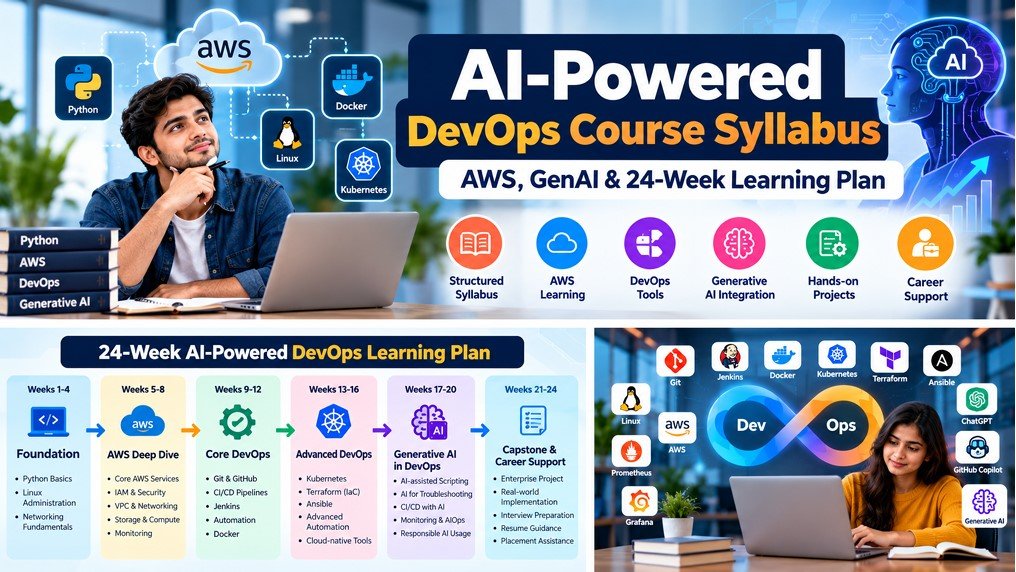
For aspiring engineers, this creates an opportunity to develop practical skills that connect software development with IT operations. However, learning DevOps can feel overwhelming at first because the field includes several technologies, including Linux, Python, AWS, CI/CD, Docker, Kubernetes and Infrastructure as Code.
That is why reviewing an AI-Powered DevOps Course Syllabus before enrolling is an important step. A structured curriculum helps you understand what you will learn, how the modules connect and how your knowledge can progress from foundational concepts to practical cloud projects.
In this guide, we explore the DevOps course syllabus with AWS and Generative AI, including the major learning phases, important tools, practical projects, prerequisites and questions you should ask before joining a training program.
If you are comparing training options, you can also explore the AI-Powered Master Program in DevOps with AWS at BinaryBrains to review the program details.
This guide will help you understand:
- What an AI-powered DevOps course typically covers.
- How AWS and cloud computing fit into the learning journey.
- Which DevOps tools and automation concepts you should study.
- How Generative AI can support DevOps workflows.
- What to look for in hands-on projects and a capstone.
- How to evaluate a course before making an enrolment decision.
What Is an AI-Powered DevOps Course Syllabus?
An AI-Powered DevOps course syllabus is a structured learning plan that combines core DevOps practices, cloud infrastructure, automation and relevant artificial intelligence applications.
Traditional DevOps training focuses on helping learners understand how software is built, tested, deployed and maintained. An AI-integrated learning program adds another layer by exploring how AI assistants can support tasks such as troubleshooting, scripting, technical documentation and operational analysis.
However, AI does not replace the need to understand the underlying technologies. Before relying on an AI assistant to suggest a deployment configuration, for example, you should understand what the configuration does and how to verify that it is secure and correct.
A well-organised DevOps course curriculum should therefore build knowledge progressively. Learners first develop a foundation in programming, Linux and networking. Next, they explore cloud services, source control, CI/CD pipelines and containerisation. Finally, they apply these concepts to automation, monitoring, AI-assisted workflows and larger projects.
The exact module sequence varies between institutes. Therefore, check the actual syllabus and practical requirements of the program rather than assuming that every course covers the same technologies.
AI-Powered DevOps Course: 24-Week Learning Plan
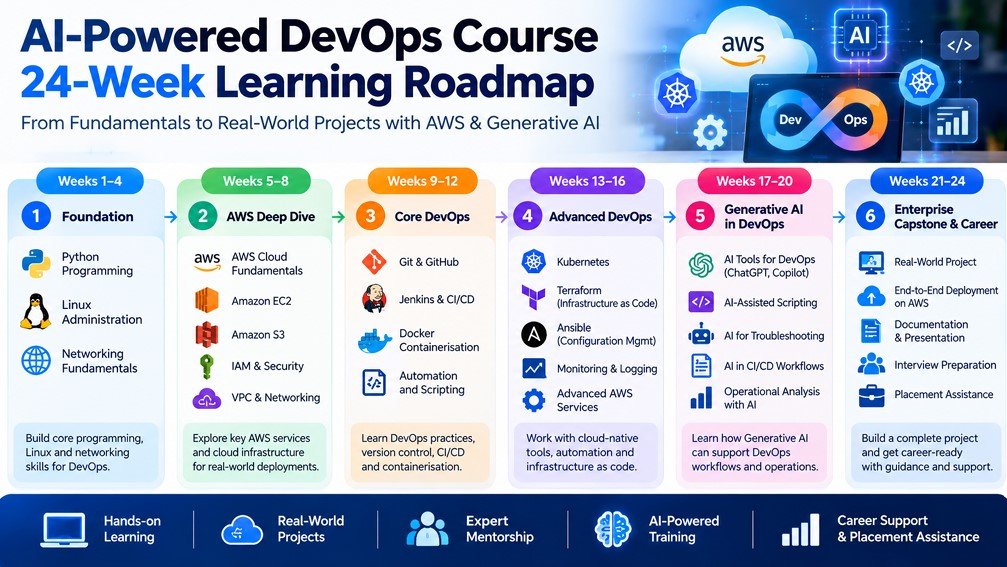
A structured learning timeline can make a complex technical subject easier to approach. The BinaryBrains AI-Powered Master Program in DevOps with AWS is presented as a 24-week learning journey, organised around foundational skills, cloud computing, core DevOps, advanced technologies, a capstone and career support. The following overview explains the major learning phases. Treat it as a high-level guide; confirm the detailed weekly timetable, assessment schedule and individual module durations with the institute.- Phase 1 – Foundation: Python, Linux and networking fundamentals.
- Phase 2 – AWS Deep Dive: Cloud infrastructure and AWS services.
- Phase 3 – Core DevOps: Version control, CI/CD, containers and automation.
- Phase 4 – Advanced DevOps: Advanced cloud-native and operational technologies.
- Phase 5 – Enterprise Capstone: Apply the concepts through a larger practical project.
- Phase 6 – Career Support: Career preparation and placement-focused guidance.
Phase 1: Python, Linux and Networking Fundamentals
Before working with cloud infrastructure and deployment pipelines, learners need to understand the environment in which applications run. Python, Linux and networking provide a useful foundation for many DevOps tasks.
Python Programming and Scripting
Python can help automate repetitive tasks, process data, interact with APIs and support operational workflows. In a DevOps course for beginners, programming fundamentals should be introduced in a way that connects concepts with practical tasks.
Topics worth looking for include:
- Variables, data types and operators.
- Conditional statements and loops.
- Functions and reusable code.
- Working with lists, dictionaries and strings.
- Reading files and handling errors.
- Basic scripting for repetitive tasks.
- Understanding how scripts can interact with APIs.
For example, a simple script can help process log files or check whether a list of services meets a particular condition. Such exercises build a foundation for more advanced automation later.
Linux Administration
Linux is widely used in cloud servers, containers and infrastructure environments. Consequently, understanding the command line is an important skill for DevOps learners.
- Linux directory structure and file management.
- Essential terminal commands.
- File permissions and ownership.
- Users, groups and process management.
- Package installation and service management.
- Basic shell scripting and troubleshooting.
With regular practice, learners become more comfortable inspecting files, managing processes and investigating common server issues.
Networking Fundamentals
Networking explains how applications, servers and services communicate. Understanding these concepts becomes especially important when deploying applications on AWS.
- IP addresses and subnetting fundamentals.
- DNS and domain resolution.
- Common network ports and protocols.
- HTTP and HTTPS.
- Firewalls and network access rules.
- Basic connectivity troubleshooting.
Learning outcome: Build the foundational knowledge needed to work with Linux systems, basic scripts and cloud networking concepts.
Phase 2: AWS Cloud Computing and Infrastructure
Cloud computing allows organisations to provision infrastructure and services without managing every physical server themselves. For DevOps engineers, cloud knowledge supports application deployment, automation, scalability and operational management.
An AWS DevOps course syllabus should explain how cloud services work together, not just introduce a collection of service names.
Core AWS Concepts
- AWS global infrastructure: Understand Regions, Availability Zones and the basics of cloud resilience.
- Amazon EC2: Learn the fundamentals of virtual servers and compute capacity.
- Amazon S3: Understand object storage and common storage use cases.
- AWS IAM: Explore identities, roles, permissions and access control.
- Amazon VPC: Learn the foundations of virtual networking in AWS.
- Amazon EBS: Understand block storage for supported compute workloads.
- Elastic Load Balancing: Learn how incoming application traffic can be distributed.
- Amazon CloudWatch: Explore monitoring, metrics, logs and alarms.
Cloud Security and Access Management
Security should be considered throughout the cloud learning journey. Learners should understand why least-privilege permissions matter and how network rules, identity policies and monitoring contribute to a safer environment.
Practical exercises can help learners explore how resources are configured, how access is controlled and how common configuration mistakes can be identified.
Connecting AWS With DevOps
After understanding the individual services, the next step is learning how they support a complete application workflow. For instance, a deployment may involve a source repository, an automated pipeline, compute resources, storage and monitoring.
This connection between cloud services and automation is what makes AWS knowledge valuable within a broader DevOps training curriculum.
Learning outcome: Understand core AWS services and their roles in cloud-based application infrastructure. The depth of coverage should be confirmed against the current program syllabus.
For additional cloud-learning information, explore AWS Training and Certification at BinaryBrains.
Phase 3: Core DevOps, Version Control and CI/CD
Once the fundamentals of programming, operating systems and cloud infrastructure are in place, learners can begin connecting development activities with deployment and operations.
Core DevOps training focuses on reducing manual work, improving collaboration and making software delivery more repeatable. Version control and CI/CD are important parts of this process.
Git and GitHub
Git helps developers track changes in source code. GitHub provides a platform for hosting repositories and collaborating on projects.
- Creating and managing repositories.
- Committing and reviewing code changes.
- Working with branches and merges.
- Understanding pull requests and collaboration.
- Managing project history and resolving common conflicts.
Continuous Integration and Continuous Delivery
CI/CD pipelines automate repeatable stages of software delivery. Depending on the project, a pipeline might check source code, run tests, build an application package and prepare a deployment.
A useful hands-on DevOps training module should explain each stage and give learners an opportunity to investigate pipeline failures.
- Understanding CI/CD concepts and workflow design.
- Creating and configuring pipeline stages.
- Automating builds and tests.
- Managing pipeline variables and credentials securely.
- Investigating failed jobs and build errors.
- Understanding deployment approvals and release processes.
Jenkins and Pipeline Automation
Jenkins is commonly used to automate build, test and deployment workflows. Learners should understand how jobs and pipelines are configured and how pipeline stages connect to a software delivery process.
For example, a basic pipeline might retrieve source code, build an application, run tests and publish an artifact. A later exercise could extend this workflow to deploy the application into an appropriate environment.
Learning outcome: Understand version control and the principles of automated software delivery, including how to read and troubleshoot a pipeline.
Phase 3 Continued: Docker and Containerisation
Applications can behave differently across development, testing and production environments. Containerisation helps package an application and its required dependencies in a consistent format.
That is why Docker is an important technology to investigate when comparing a DevOps course curriculum.
Docker Topics to Look For
- Containers and images.
- Dockerfiles and image creation.
- Building, tagging and running images.
- Container ports, environment variables and storage.
- Container networking fundamentals.
- Image registries and image distribution.
- Container logs and basic troubleshooting.
How Docker Fits Into a DevOps Workflow
Consider an application that runs correctly on a developer’s laptop but fails in another environment because a dependency is missing. Packaging the application and its dependencies in a container can help make the runtime environment more consistent.
In a practical exercise, learners might create a Docker image, run a container, inspect its logs and troubleshoot a configuration issue. They can then explore how the image fits into an automated build and deployment pipeline.
However, building a container is only one part of the process. Learners should also understand image security, configuration management and the operational requirements of running containers.
Learning outcome: Understand container fundamentals and how container images can be incorporated into application delivery workflows.
Phase 4: Kubernetes and Advanced DevOps Technologies
As containerised applications become more complex, teams may need ways to manage deployment, scaling, networking and recovery across multiple workloads. Kubernetes is a container orchestration platform designed to help manage these tasks.
An advanced DevOps course may introduce Kubernetes after learners understand containers and basic deployment workflows. This order helps make the orchestration concepts easier to follow.
Kubernetes Fundamentals
- Understanding clusters and nodes.
- Pods and workload controllers.
- Deployments and rolling updates.
- Services and service discovery.
- Configuration and secrets.
- Resource requests and limits.
- Scaling and basic application troubleshooting.
Infrastructure as Code With Terraform
Infrastructure as Code allows infrastructure to be defined and managed through configuration files. Terraform is one tool used for this purpose.
Rather than manually creating every resource, teams can define the desired infrastructure in code and review changes before applying them.
Topics worth checking in the syllabus include:
- Terraform configuration and providers.
- Resources and variables.
- State management fundamentals.
- Planning and applying infrastructure changes.
- Reusable modules and configuration organisation.
- Safe handling of credentials and sensitive values.
Configuration Management With Ansible
Ansible is used to automate configuration and operational tasks across systems. Learners may explore inventories, playbooks, variables and repeatable task execution.
For example, an automation workflow might install required packages, configure a service or apply consistent settings across multiple servers.
Why These Technologies Matter Together
Docker packages applications, Kubernetes manages containerised workloads, Terraform helps provision infrastructure and Ansible can automate configuration tasks. Their roles are different, but they can complement one another in a broader delivery workflow.
Learning outcome: Understand the purpose of common advanced DevOps tools and how they may fit into cloud-native infrastructure and application operations. Confirm which tools are taught in depth in the actual course.
Phase 5: Generative AI and AI-Assisted DevOps Workflows
Generative AI is creating new ways to interact with technical information, draft scripts, explain error messages and support troubleshooting. In DevOps, these capabilities can help engineers investigate problems and reduce some repetitive work.
However, Generative AI for DevOps should be taught as a practical support capability rather than a replacement for technical understanding. AI-generated code, commands and infrastructure configurations must be checked before they are used.
AI-Assisted Scripting and Documentation
AI assistants can help explain unfamiliar code, suggest improvements to a script or create a first draft of technical documentation. Learners should practise reviewing these outputs and testing them in a safe environment.
Using AI to Understand Errors
When a deployment fails, an engineer may need to review logs, inspect configuration and identify the cause. An AI assistant can help summarise an error message or suggest possible areas to investigate.
Nevertheless, these suggestions are hypotheses, not proof. The engineer still needs to verify the root cause through logs, tests and system behaviour.
AI Support for CI/CD Workflows
AI tools may assist with drafting pipeline configurations, explaining pipeline syntax and identifying potential improvements. Before adopting a suggested change, learners should check whether it meets the project’s security, reliability and operational requirements.
AI, Monitoring and Operational Analysis
AI-assisted analysis can help teams interpret large amounts of operational information. Depending on the platform and implementation, AI may support alert summaries, incident investigation and pattern discovery.
These capabilities are not automatically included in every DevOps course. Ask the training provider which AI tools and use cases are actually taught, and whether learners complete practical exercises.
Security and Responsible AI Usage
- Never share secrets, passwords, access tokens or sensitive production data with an unapproved AI service.
- Review generated scripts before execution.
- Validate commands in a controlled environment.
- Check infrastructure permissions and security settings.
- Follow your organisation’s policies for approved AI tools.
Learning outcome: Understand where AI assistants can support DevOps work, how to verify their suggestions and why human review remains important.
For a deeper overview, read the BinaryBrains guide to Generative AI for DevOps, including AWS and AI-assisted tools.
Monitoring, Logging and Application Reliability
Deploying an application is not the end of the DevOps workflow. Teams must also understand whether the application is healthy, how it performs under load and what happens when something goes wrong.
For this reason, DevOps monitoring and logging are important areas to consider when evaluating a course syllabus.
Monitoring Fundamentals
- Understanding metrics, logs and events.
- Monitoring application and infrastructure health.
- Creating alerts for relevant conditions.
- Investigating performance problems.
- Understanding dashboards and operational visibility.
Monitoring Tools and AWS Services
Depending on the curriculum, learners may encounter Amazon CloudWatch, Prometheus and Grafana. These tools serve different purposes, so the course should explain their roles rather than treating them as interchangeable.
For example, a practical exercise might involve reviewing application logs, checking infrastructure metrics and investigating why a service is responding slowly.
Reliability and Incident Investigation
Reliable systems require more than monitoring dashboards. Engineers must be able to investigate failures, understand dependencies and identify improvements that reduce the likelihood or impact of future incidents.
AI-assisted summaries may help organise operational information, but engineers should validate the evidence and confirm the actual cause of a problem.
Learning outcome: Understand how monitoring, logging and troubleshooting support the ongoing operation of cloud applications.
Phase 6: Enterprise Capstone and Practical Projects
Learning individual tools is useful, but real DevOps work often requires several technologies to operate together. A capstone project gives learners an opportunity to apply concepts from different modules to a larger problem. When reviewing an AI-Powered DevOps course syllabus, ask whether the capstone includes meaningful implementation work, testing, troubleshooting and feedback.
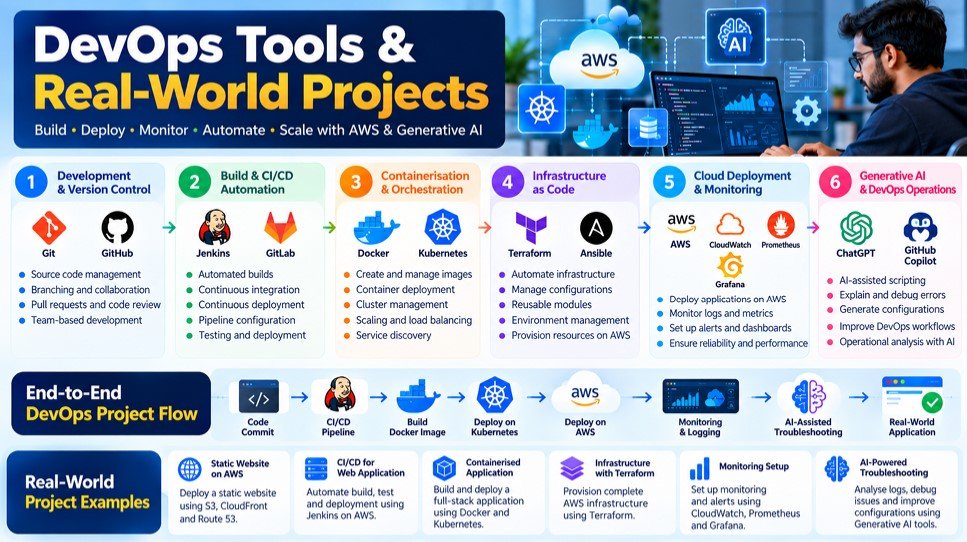
Examples of DevOps Learning Projects
- Automated CI/CD pipeline: Create a workflow that retrieves source code, runs checks and prepares an application for deployment.
- Containerised application: Package an application with Docker and document how to run it consistently.
- AWS infrastructure deployment: Explore how cloud resources can be provisioned and configured for an application.
- Infrastructure as Code: Use Terraform to define and manage an appropriate test environment.
- Container orchestration: Deploy a suitable application using Kubernetes concepts.
- Monitoring exercise: Configure relevant monitoring and investigate a simulated application issue.
- AI-assisted troubleshooting: Use an approved AI assistant to examine an error, verify its suggestions and document the final resolution.
What Should a Capstone Demonstrate?
A meaningful project should show that you understand the problem, can explain the tools you selected and can describe how the workflow operates. Where appropriate, keep project documentation that explains the architecture, setup steps, configuration choices, tests and known limitations. This makes it easier to revisit your work and discuss it during a technical interview. For the confirmed program structure and current capstone details, visit the BinaryBrains AI-Powered DevOps with AWS program page.Who Should Consider an AI-Powered DevOps Course?
An AI-integrated DevOps program may suit different learners, but the right starting point depends on their existing knowledge, career goals and available study time.
College Students and Fresh Graduates
Students who want to explore cloud computing and software delivery can use structured training to build their technical foundation. However, they should check the prerequisites and be prepared to practise outside scheduled classes.
IT Support and System Administration Professionals
Professionals who already work with operating systems, servers or IT infrastructure may find it useful to build on their existing knowledge with cloud services, automation and deployment workflows.
Software Developers
Developers who want to understand how their applications are built, packaged and deployed may benefit from studying source control, CI/CD, containers and cloud infrastructure.
Cloud and DevOps Professionals
People with existing cloud or DevOps experience may want to strengthen specific areas, such as infrastructure automation, Kubernetes, monitoring or AI-assisted workflows. They should compare the course modules against the skills they already possess.
Career Changers
Those moving into technology from another field should first understand the course’s entry requirements, expected workload and foundational support. A structured learning path can provide direction, but progress still requires consistent practice.
Before enrolling: Match your background to the syllabus and ask the institute which prerequisites you should complete first.
Do You Need Coding Experience to Learn DevOps?
You do not necessarily need to be an experienced software developer to begin learning DevOps. However, programming and scripting knowledge can make automation tasks easier to understand.
For beginners, the important question is whether the DevOps course for beginners introduces programming and technical fundamentals at an appropriate pace.
Python can help with scripting and automation. Meanwhile, shell commands are useful for working with Linux systems, and configuration languages are used to define pipelines and infrastructure.
You should also become comfortable reading code, interpreting errors and making small changes to configuration files.
AI assistants can explain unfamiliar concepts or suggest possible solutions. Even so, you should understand and test the output rather than relying on generated code without review.
If you are starting from scratch, ask the training provider:
- Are Python and Linux taught from the fundamentals?
- What prior programming knowledge is expected?
- How much independent practice is recommended?
- Are assignments provided for beginners?
- What support is available when learners encounter difficulties?
These questions will help you decide whether the program matches your current skill level.
How to Choose the Right DevOps Course Syllabus
Not every course that mentions AWS, Docker, Kubernetes and AI provides the same learning experience. Some focus on demonstrations, while others include guided exercises, projects and feedback.
Therefore, compare the actual curriculum and learning arrangements before making a decision.
1. Review the Full Curriculum
Request the module list and check whether the course explains the fundamentals before moving into advanced technologies. Look for a logical sequence rather than a long list of disconnected tool names.
2. Ask About Hands-On Labs
Find out which exercises you will complete yourself, how practical sessions are delivered and whether you can practise troubleshooting independently.
3. Check the Project Requirements
Ask what learners build, which technologies they use and how their work is reviewed. A clear project brief is more useful than a vague promise of real-world experience.
4. Understand the AI Component
Ask which AI tools and use cases are included. Confirm whether the course teaches verification, privacy and security alongside AI-assisted workflows.
5. Confirm the Duration and Learning Commitment
A 24-week timeline does not automatically tell you how many hours you will need each week. Request the timetable and ask about live sessions, independent practice and assignment deadlines.
6. Clarify Career Support
Ask what career preparation is offered, whether eligibility requirements apply and how learners access available support. Placement assistance should not be interpreted as a guaranteed job.
These checks will help you compare programs using the quality of the learning experience rather than promotional claims alone.
Why Consider BinaryBrains for DevOps with AWS and GenAI?
After reviewing the syllabus, the next step is to determine whether the program’s structure, teaching format and practical learning opportunities suit your goals.
The AI-Powered Master Program in DevOps with AWS at BinaryBrains is presented as a 24-week learning journey that combines foundational knowledge, AWS, core and advanced DevOps, an enterprise capstone and career support.
The program’s stated learning phases include:
- Foundational learning in Python, networking and Linux.
- AWS cloud services and infrastructure concepts.
- Core DevOps practices, including version control, CI/CD, containers and automation.
- Advanced DevOps and cloud-native technologies.
- An enterprise capstone phase.
- Career preparation and placement-focused support.
Rather than selecting a program based on its title alone, review the detailed syllabus and ask which technologies are taught through practical exercises. You should also confirm the current course fees, batch availability, training format and scope of career support.
If you are still comparing options, you can explore the DevOps with AWS training program in Pune for additional location-specific information.
Want to understand whether the course suits your goals? Book a demo class with BinaryBrains and discuss your learning requirements with the team.
Career Opportunities After DevOps Training
Learning DevOps technologies can help you explore roles involving cloud infrastructure, software delivery, automation and application operations. The roles available to you will depend on your existing experience, practical skills and the requirements of individual employers.
Some career paths related to DevOps and cloud computing include:
- DevOps Engineer: Works on automation, deployment workflows and collaboration between development and operations teams.
- Cloud Engineer: Helps provision, configure and maintain cloud infrastructure.
- Cloud Operations Engineer: Supports the operation, availability and monitoring of cloud-based services.
- CI/CD Engineer: Focuses on build pipelines, testing automation and software delivery processes.
- Site Reliability Engineer: Works on reliability, service performance, automation and operational resilience.
- Platform Engineer: Helps build and maintain internal platforms and reusable infrastructure capabilities.
These roles have different responsibilities and experience requirements. Completing a course alone does not qualify every learner for every position; practical ability, relevant experience and interview performance also matter.
To explore the skills and learning stages associated with the field, read the AI DevOps Engineer Roadmap 2026.
Comments are closed